メインコンテンツへスキップ

前提条件

LangGraph を Connect AI と連携させる前に、以下の準備が必要です。
  • Connect AI アカウントにデータソースを接続します。詳細については、ソース を参照してください。
  • 設定ページでパーソナルアクセストークン(PAT)を生成します。認証時のパスワードとして使用するため、コピーして保管してください。
  • OpenAI API キーを取得します:https://platform.openai.com/
  • LangChain および LangGraph パッケージをインストールするために Python >= 3.10 が必要です。

Python ファイルの作成

1
LangGraph MCP 用のフォルダーを作成します。
2
フォルダー内に langraph.py という Python ファイルを作成します。
3
以下のテキストを langraph.py に貼り付けます。Base64 エンコードされた Connect AI ユーザー名と PAT(前提条件で取得)を指定する必要があります。
"""
Simple LangGraph + MCP + OpenAI Integration
Pure LangGraph implementation without LangChain
"""
import asyncio
from typing import Any
from langgraph.graph import StateGraph, START, END
from langgraph.prebuilt import create_react_agent
from langchain_mcp_adapters.client import MultiServerMCPClient
from langchain_openai import ChatOpenAI
from langchain_core.messages import BaseMessage, HumanMessage, AIMessage, ToolMessage
from typing_extensions import TypedDict, Annotated
import operator

class AgentState(TypedDict):
    """State for the LangGraph agent"""
    messages: Annotated[list[BaseMessage], operator.add]

async def main():
    # Configuration
    MCP_BASE_URL = "https://mcp.cloud.cdata.com/mcp"
    MCP_AUTH = "YOUR_BASE64_ENCODED_EMAIL:PAT"
    OPENAI_API_KEY = "YOUR_OPENAI_API_KEY"
    
    # Step 1: Connect to MCP server
    print("🔗 Connecting to MCP server...")
    mcp_client = MultiServerMCPClient(
        connections={
            "default": {
                "transport": "streamable_http",
                "url": MCP_BASE_URL,
                "headers": {"Authorization": f"Basic {MCP_AUTH}"} if MCP_AUTH else {},
            }
        }
    )
    
    # Step 2: Load all available tools from MCP
    print("📦 Loading MCP tools...")
    all_mcp_tools = await mcp_client.get_tools()
    tool_names = [tool.name for tool in all_mcp_tools]
    print(f"✅ Found {len(tool_names)} tools: {tool_names}\n")
    
    # Step 3: Initialize OpenAI LLM
    print("🤖 Initializing OpenAI LLM...")
    llm = ChatOpenAI(
        model="gpt-4o",
        temperature=0.2,
        api_key=OPENAI_API_KEY
    )
    
    # Step 4: Create LangGraph agent
    print("⚙️ Creating LangGraph agent...\n")
    agent = create_react_agent(llm, all_mcp_tools)
    
    # Step 5: Create the graph
    builder = StateGraph(AgentState)
    builder.add_node("agent", agent)
    builder.add_edge(START, "agent")
    builder.add_edge("agent", END)
    graph = builder.compile()
    
    # Step 6: Run agent with your query
    user_prompt = "List down the first record from the Activities table from ActCRM1"
    print(f"❓ User Query: {user_prompt}\n")
    print("🔄 Agent is thinking and using tools...\n")
    
    initial_state = {
        "messages": [HumanMessage(content=user_prompt)]
    }
    
    result = await graph.ainvoke(initial_state)
    
    # Step 7: Print final response
    final_response = result["messages"][-1].content
    print(f"✨ Agent Response:\n{final_response}")

if __name__ == "__main__":
    asyncio.run(main())

LangChain および LangGraph パッケージのインストール

プロジェクトのルートターミナルで pip install -U langgraph langchain langchain-openai langchain-mcp-adapters typing-extensions を実行します。
Python スクリプトの実行

1
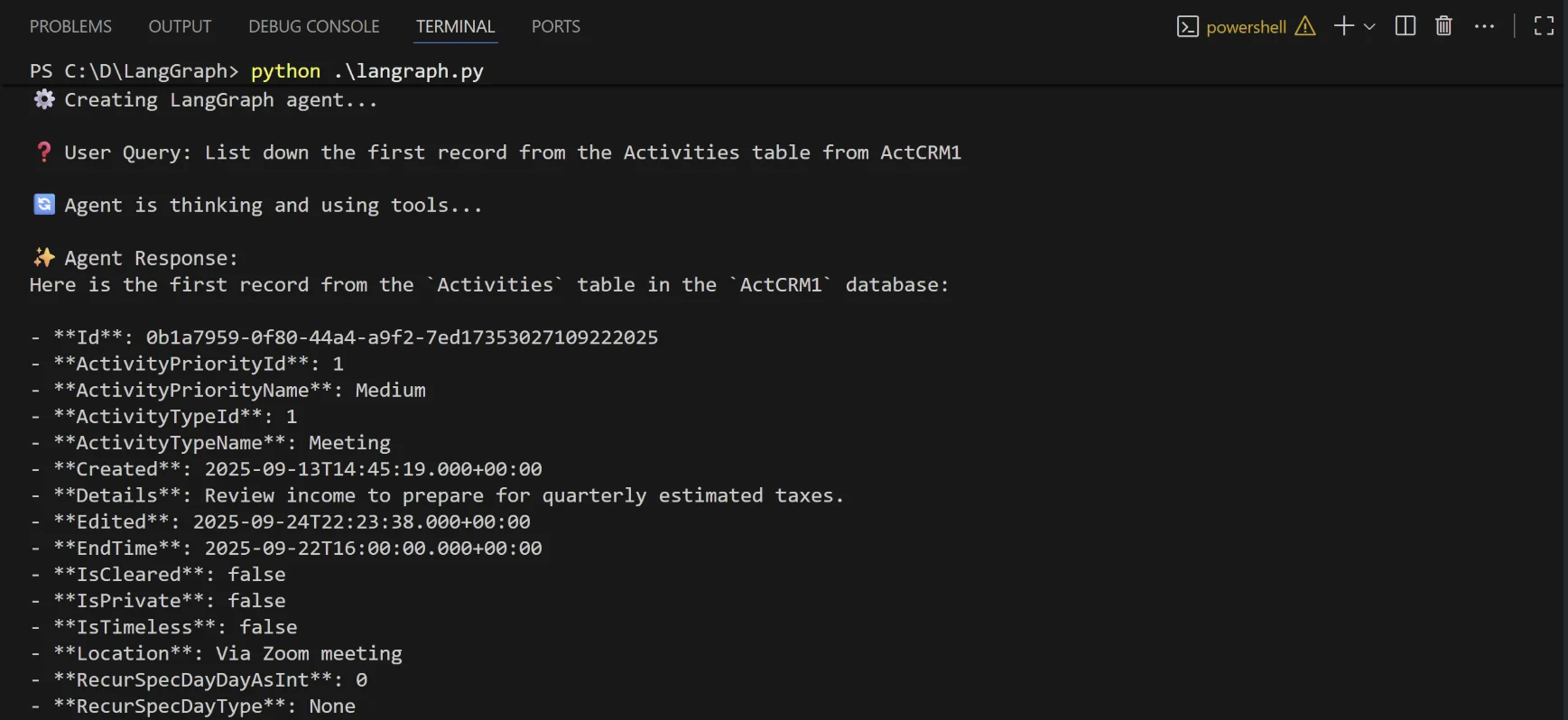
インストールが完了したら、python langraph.py を実行してスクリプトを実行します。
2
スクリプトは、LLM が接続されたデータをクエリするために必要な Connect AI MCP ツールを検出します。
3
エージェントにプロンプトを提供します。エージェントが応答を返します。